

Best Photoshop Overlays for Portrait Photography in 2026
A technically perfect portrait can still look flat. This guide ranks the overlays that actually fix that, and shows you which one to reach for depending on the mood you're after.
- Real optical overlays (light captured through actual glass) blend into skin tones far more naturally than digitally-rendered or AI-generated light effects.
- Master Lighting Kit™ wins for portrait photographers who want one bundle that covers framing, cinematic streaks, dreamy distortion, and flare/glow.
- Halo Pro is the single best pick if you only want one overlay: its ring-of-fire glow instantly frames a subject.
- Free overlay packs are fine for testing the technique, but expect far lower resolution and a more generic, "everyone's used this one" look.
- Manual light painting with brushes gives full control but takes real practice to look convincing and is very time-consuming.
Why This Matters
Most "light effects" in Photoshop fall into one of two camps: math-based digital filters, or overlays captured from real, physical light sources. The difference shows up the moment you zoom in. A digitally-rendered flare has clean, mathematically perfect edges. Light doesn't actually behave that way. Real optical overlays are shot through actual lenses and glass, which means they carry the same imperfections, falloff, and grain that light has when it hits your camera sensor for real. That's why they blend into a photo instead of sitting on top of it. It's the difference between looking added and looking like it was always there.
If you've ever dropped a "light leak" PNG onto a portrait and had it look pasted on, this is usually why: it wasn't real light to begin with.
What Makes a Good Overlay for Portrait Photography
- Optical authenticity: captured from real light sources, not rendered or AI-generated
- Skin tone compatibility: blends into highlights and skin without color-shifting or oversaturating
- Resolution: high enough to hold up on a full-frame or medium-format file without pixelating
- Versatility: usable across studio, outdoor, and low-light portrait setups
- Ease of masking: clean enough that isolating the subject's face doesn't take an hour
At a Glance
| Option | Best for | Standout feature | Key limitation |
|---|---|---|---|
| Master Lighting Kit™ | Portrait photographers who want full range | All four core overlay types in one bundle | Bigger upfront purchase than a single pack |
| Halo Pro | Framing a subject with a glow | Real ring-of-fire optical flare, very high resolution | Most effective on darker or backlit shots |
| Anamorphic Pro | Moody, cinematic night portraits | Long horizontal lens streaks. Very high resolution | Needs a strong light source to look natural |
| Prism Pro | Dreamy, editorial-style shots | Organic chromatic refraction and color leaks | Best used sparingly, easy to overdo |
| Light Hits Pro | Adding cinematic flare and glow to highlights | Real cinema-glass lens flares | Best paired with an existing light source in the shot |
| Free overlay packs | Testing the technique, zero budget | No cost | Low resolution, less detailed, generic/overused look |
| Manual light painting | Full creative control | No purchase needed | Time-consuming, steep learning curve |
1. Master Lighting Kit™ — Best Overall for Portrait Photographers
The Master Lighting Kit™ bundles Halo Pro, Anamorphic Pro, Prism Pro, and Light Hits Pro, covering framing, cinematic streak, dreamy distortion, and flare/glow, without buying each pack separately.
Pros:
- One purchase covers framing, cinema-streak, distortion, and flare/glow looks
- Real optical capture across every overlay in the kit
- Cost-effective compared to buying the four packs individually
Cons:
- More than you need if you only shoot one specific style consistently
Best for: photographers who shoot a range of portrait styles and want one toolkit that handles all of them.
Verdict: Buy.

2. Halo Pro — Best for Framing a Subject
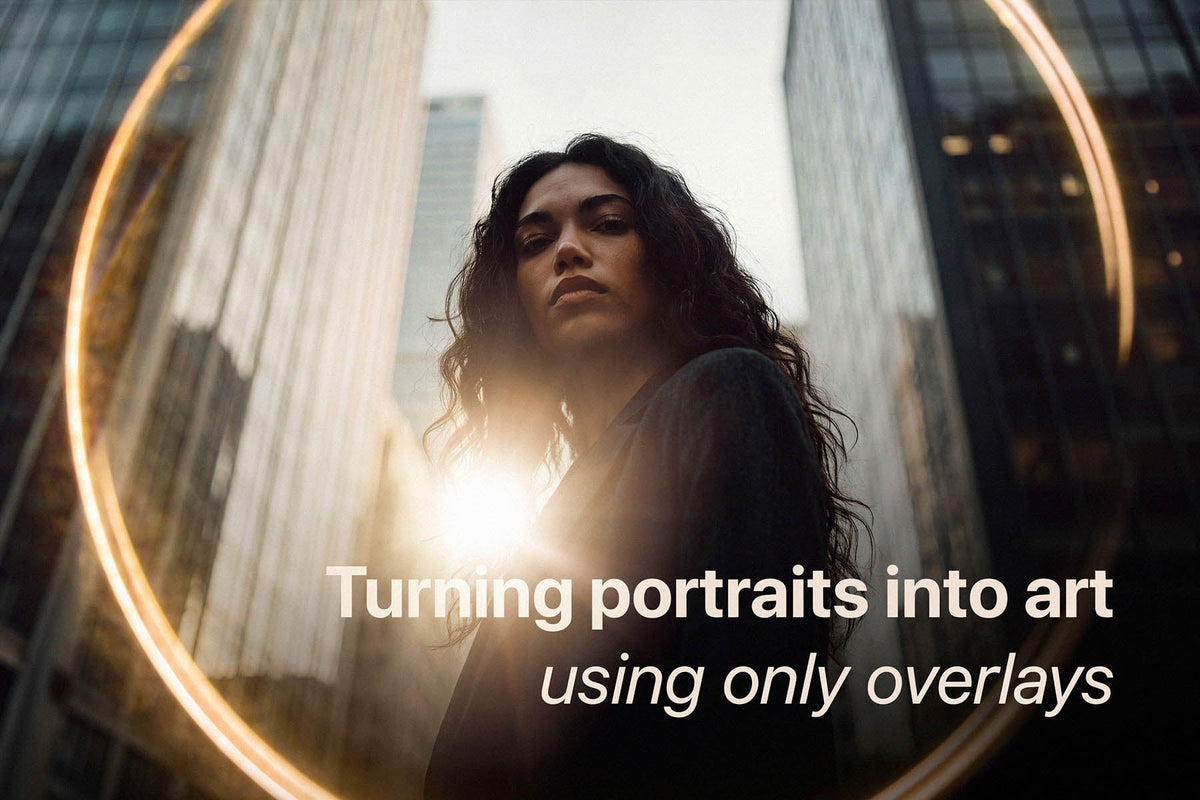
Halo Pro gives you a real, physical ring-of-fire light reflection that wraps around your subject, drawing the eye directly to them instead of a busy background.
Pros:
- Instantly frames the subject, no manual vignetting needed
- Natural falloff since it's captured from real light, not drawn
- Works well on backlit or golden-hour shots
- Up to 11K resolution, holds up on large prints and high-res files
Cons:
- Less effective on flat, evenly-lit studio shots with no natural light source to work with
Best for: photographers who want one overlay that consistently elevates outdoor or backlit portraits.
Verdict: Buy. If you only buy one overlay, this is the one.

3. Anamorphic Pro — Best for Cinematic Night Portraits
Anamorphic Pro adds long, horizontal lens streaks that usually require dedicated cinema glass, useful for giving street or night portraits a moody, film-like energy.
Pros:
- Instant "cinema" feel without specialized lens equipment
- Strong for dark, high-contrast, or urban portrait settings
- Up to 11K resolution, holds up on large prints and high-res files
Cons:
- Needs a real light source in the frame (streetlight, neon sign, headlights) to look convincing, and doesn't work as well on daylight studio shots
Best for: photographers regularly shooting night, street, or urban portrait work.
Verdict: Buy if moody/night portraits are a regular part of your work. Skip otherwise.

4. Prism Pro — Best for Dreamy, Editorial Portraits
Prism Pro introduces organic chromatic refractions and soft color leaks, the imperfect, glass-distorted look you'd get shooting through an actual prism.
Pros:
- Breaks up overly clean, digital-looking portraits with organic texture
- Strong fit for fashion, editorial, or outdoor natural-light shoots
Cons:
- Easy to overdo, works best applied subtly, at lower opacity
Best for: editorial and fashion-leaning portrait photographers after that "analog imperfection" look.
Verdict: Buy if editorial/dreamy is your niche. Otherwise it's the most situational of the four.

5. Light Hits Pro — Best for Cinematic Flare and Glow
Light Hits Pro adds 34 optically-captured light hits and lens flares, shot through real cinema glass. It's the kind of glow and highlight scattering that's genuinely hard to fake digitally.
Pros:
- Real cinema-glass capture, not rendered, highlights scatter the way actual light does
- Up to 10K resolution, holds up on large prints and high-res files
- Compatible with both Photoshop and Affinity Photo
Cons:
- Works best when there's already a highlight or light source in the shot to build on, less effective on completely flat lighting
Best for: photographers who want to add polish and glow to existing highlights rather than create a light source from scratch.
Verdict: Buy, especially if you're already leaning toward the Master Lighting Kit™, since Light Hits Pro is one of the four packs included in it.

6. Free Overlay Packs — Best for Testing the Technique on a Budget
Free light leak and flare packs are a legitimate way to learn how overlay blending works before spending anything.
Pros:
- Zero cost, good for learning blend modes and masking
- Widely available, easy to find
Cons:
- Far lower resolution, which can pixelate on high-res files
- Often digitally rendered rather than optically captured, so blending can look pasted-on
- Same handful of free overlays show up across thousands of photos online, so results rarely look distinct
Best for: photographers just starting to experiment with the technique.
Verdict: Hold. Useful for practice, not for unique work.
7. Manual Light Painting — Best Free, Full-Control Option
Hand-painting light with a soft brush, gradient tool, and dodge & burn gives total control with no purchase required.
Pros:
- Completely free
- Full creative control over shape, color, and intensity
- No risk of an overlay looking generic since you're building it from scratch
Cons:
- Time-consuming: a single convincing light source can take significant manual work
- Steep learning curve to make hand-painted light look physically believable
Best for: photographers with the time and skill to build custom light entirely by hand.
Verdict: Wait. Worth learning eventually, not a fast solution today.
How This List Was Ranked
Each option was weighed against the same five criteria: optical authenticity, skin tone compatibility, resolution, versatility, and ease of masking. Halo Pro, Anamorphic Pro, Prism Pro, and Light Hits Pro each lead in a specific mood rather than competing directly with each other. That's why the Master Lighting Kit™ wins on versatility, bundling all four rather than forcing a single choice. Free packs and manual light painting sit at opposite ends of the effort scale: zero skill required versus zero cost but real time investment.
Which Portrait Overlay Should You Choose in 2026?
If you shoot a range of portrait styles, the Master Lighting Kit™ is the buy. It covers framing, cinematic mood, dreamy distortion, and flare/glow without needing four separate purchases. Shooting mostly backlit or golden-hour portraits, Halo Pro alone is the highest-impact single pick. Night and street portrait photographers should look at Anamorphic Pro, editorial and fashion shooters get the most from Prism Pro, and anyone wanting to polish existing highlights should look at Light Hits Pro. Free packs are a reasonable place to learn the technique, and manual light painting remains the only fully free, fully custom route if you have the time to develop it.

FAQ
What's the best Photoshop overlay for portrait photography in 2026?
The Master Lighting Kit™ is the best overall choice since it covers the four most common portrait moods (framing, cinematic streak, dreamy distortion, and flare/glow) in one bundle. For a single overlay, Halo Pro has the broadest impact.
Are real optical overlays actually better than AI-generated light effects?
Yes, for blending purposes. Real overlays are captured from physical light sources, so they carry natural falloff and imperfection that digitally-rendered or AI-generated effects calculate mathematically and often don't fully replicate.
Can I use free overlay packs for client work?
You can, but expect lower resolution and a more generic look since the same free packs are reused across many photographers' work. They're better suited to practicing the technique than to paid client deliverables and unique images and artworks.
Do overlays work on studio portraits with flat lighting?
Some do better than others. Halo Pro, Anamorphic Pro, and Light Hits Pro rely on a directional or backlit light source to look more natural, while Prism Pro's distortion effect works across a wider range of lighting setups.
How much overlay is too much on a portrait?
As a general rule, if the overlay draws more attention than your subject's face, dial back the opacity. Most of these overlays look best when used in a subtle way, masked away from the subject's eyes or face.
Do these overlays work in Lightroom too, or only Photoshop and similar software?
These are overlay files (blended via layers and blend modes) that are compatible with Photoshop CS6 and newer, Photoshop Elements, Affinity Photo and Studio, Pixelmator Pro and ON1 Photo Raw. For a Lightroom-based workflow, look at a preset-based approach instead.


Leave a comment
This site is protected by hCaptcha and the hCaptcha Privacy Policy and Terms of Service apply.