


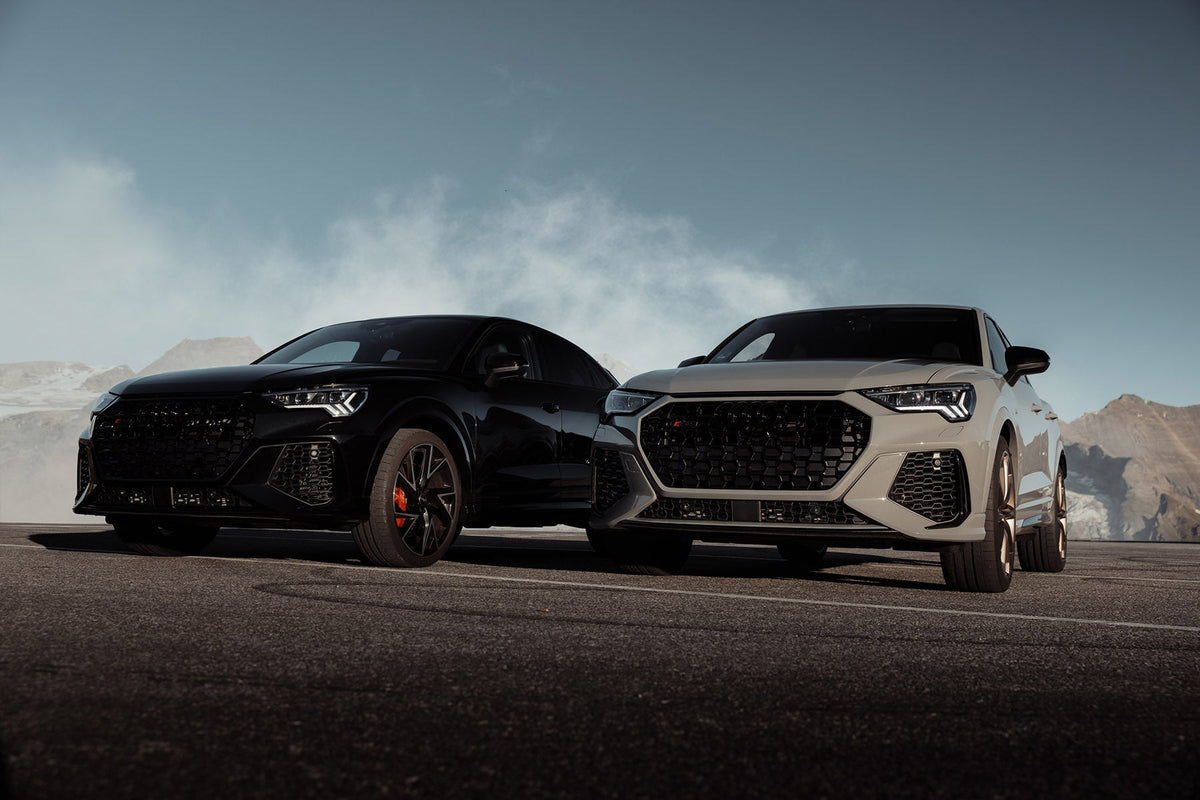
Short answer: I use overlays on roughly half my exterior shots, only where the scene already has some drama to work with, and never so heavy that it hides the car's own lines. Here's how I decide when and how much.
Let’s Talk Car Exteriors (And Why Overlays Aren’t Just for Interior Drama)
Following up on my previous posts about editing car interiors, I want to shift gears, literally, and talk about exterior shots.
Just like with interiors, I’m not into that squeaky-clean, sterile look. If it feels like the car’s being prepped for a museum instead of a moody roadside shoot, I’m out. I want light flares, highlights, shadows, and drama. The kind of stuff that makes you feel like the car just finished a high-stakes getaway or at least drove through some atmosphere.
Now, I’m not going to pretend I use overlays and brushes on every shot. That would be a lie and I’m already trying to be a better person. I use them maybe 50 percent of the time if the scene calls for it. And that’s the key: don’t force it.
A good overlay should add to the image, not hijack it and turn it into a bad Fast & Furious poster. If it looks ridiculous, well, it probably is. Today, I’ll show you a few examples where I’ve added overlays and brushes just enough to give it that edge. Most of the time, if I’ve done it right, you won’t even notice they’re there. And that’s the goal.
Subtle does it. I know, I’m repeating myself. But it’s worth repeating. Subtle does it.
What I Use Overlays & Brushes For:
-
Highlighting the car – Separating it from the background so it doesn’t get swallowed by trees, concrete, or that one bystander who won’t move
-
Adding character – Think light hits, glows, or emphasizing the mood like a warm sunset cruise or stormy mountain pass
-
Cinematic touches – Flares, contrast, a little movie magic
-
Adding motion – Like in that G-Wagon shot. A bit of dust overlay and suddenly it feels like it’s tearing across the desert instead of parked politely on a road
Products used: Vapor Pro Anamorphic Pro



Leave a comment
This site is protected by hCaptcha and the hCaptcha Privacy Policy and Terms of Service apply.